

On this page
May was about polish where it counts: the storefront widget your customers actually use, the admin flows your team runs every day, and the start of the integration layer developers have been asking for. Here's what shipped.
Event Collection Search 🔍
The All Events Collection widget now supports a filter bar at the top, with a live "Check Availability" CTA backed by real per-event availability:
- Location for multi-location stores
- Date, picks a calendar day; only events with availability that day show up
- Time, morning / afternoon / evening
- Guests, hides events that can't accommodate the chosen party size
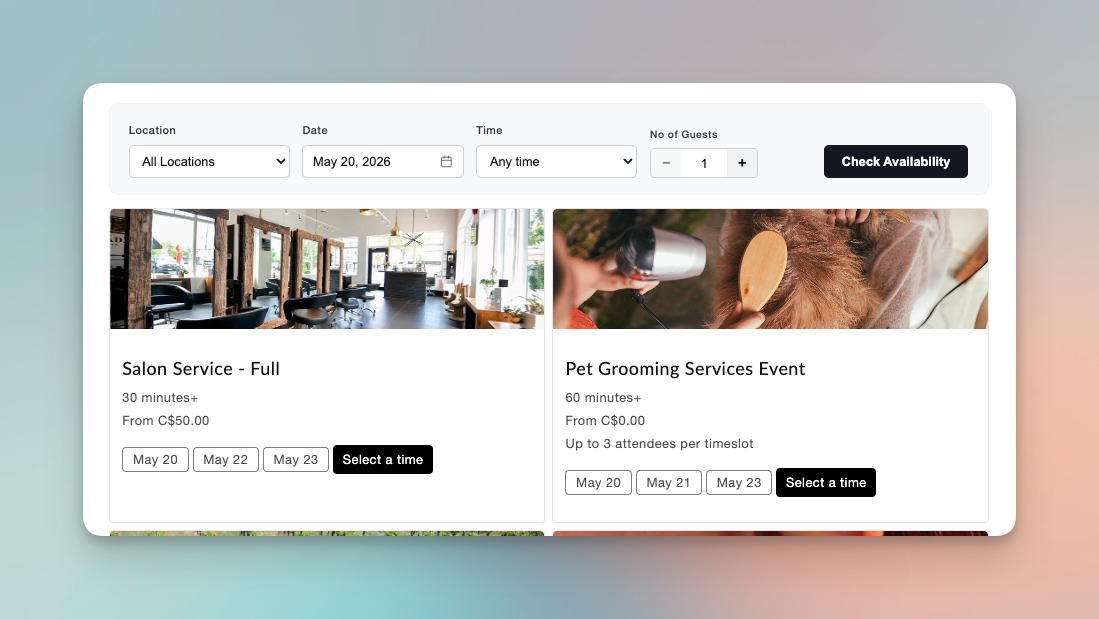
Toggle it on under Settings → Marketing → Show Filter Bar. Filtered cards show the selected date as a pill. If nothing matches, customers see a friendly "no events match your filters" message instead of an empty grid.
If you run a large catalog (a gym with class types, a winery with multiple tour formats, a multi-location service), this cuts customer scroll time and surfaces real availability up front.
"Book Another" Admin Shortcut ☎️
After creating a manual booking from any admin entry point (Dashboard "Add a Booking", the Bookings tab, the customer detail page, the team-viewer modal), an inline success banner now appears with:
- View booking, jump to the booking's detail page
- Book another, keep the booking flow open with the customer's details pre-filled
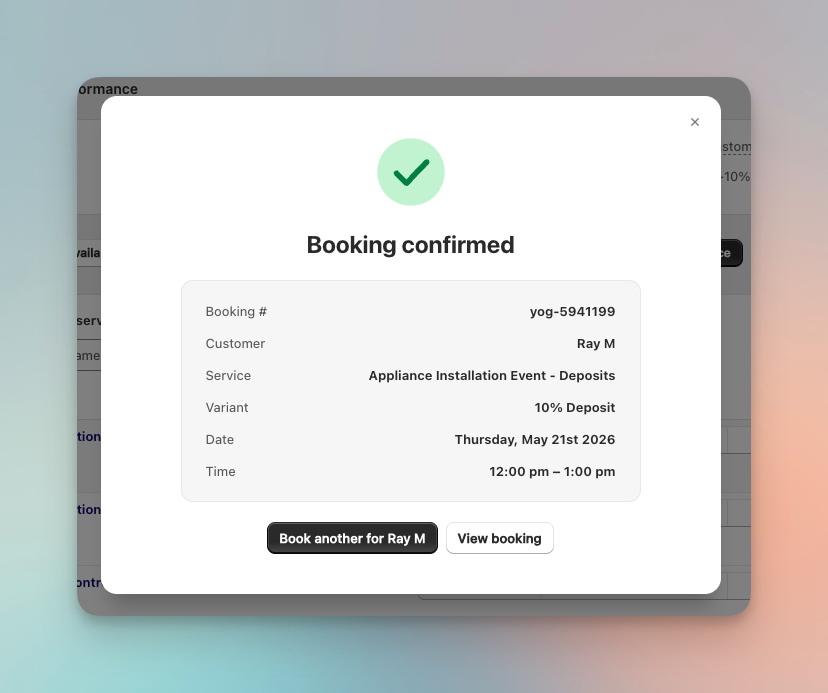
If your team books customers over the phone (clinics, salons, hairdressers), you can now chain multiple bookings for the same customer without restarting the flow each time.
Pre-select Group Size Before Picking a Time 👥
For events that allow more than one attendee per booking, you can now show a quantity selector above the storefront calendar. The customer picks their party size first, then the calendar only shows timeslots with enough remaining capacity for them.
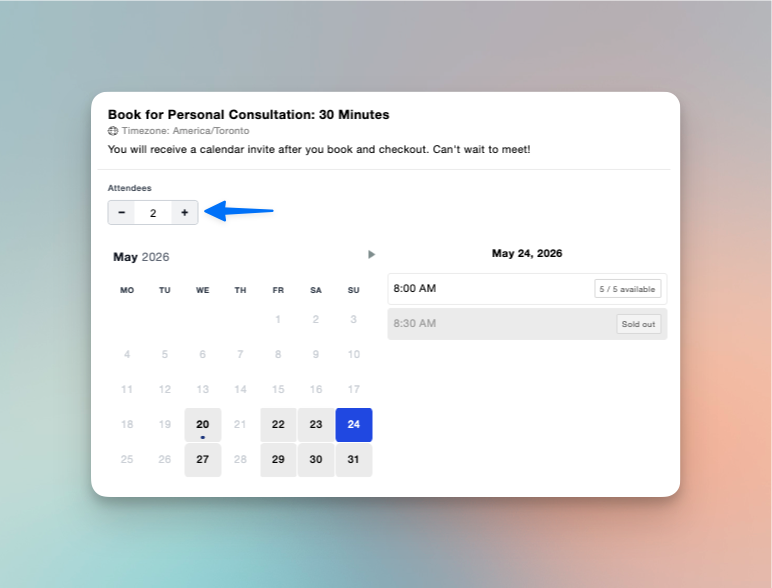
Enable it under Settings → Storefront → Allow pre-selecting number of attendees.
Great for tours, classes, and tastings, anywhere a customer picking a slot and then finding out it won't fit their party is a bad experience.
Packages, Revamped 📦
The Packages page is now split into two clearly-labeled tabs:
- Packages, your templates ("5 sessions", "10 sessions" products).
- Purchased, every package a customer has actually bought, with remaining balance and expiry date.
On the Purchased tab you can now search by package name (in addition to customer name, email, order number, and package ID), and you can edit a customer's expiry date directly from the row's Edit button. Extend, shorten, or push out an expiry without needing support.
If you run session packs, class bundles, or spa packages, this should cut down on "can you extend my customer's expiry?" tickets to near zero.
Advanced Availability Rules 📐
You can now set different capacity and staffing for specific dates and times of day without touching your event's defaults.
For a given date range, a rule lets you:
- Change the capacity per timeslot (raise it for peak season, lower it for intimate Friday evenings)
- Target specific times of day (apply the rule only from 8:30 PM to 10:00 PM, for example)
- Set a repeating weekly schedule (every Saturday, every Tuesday and Wednesday morning)
- Swap availabilities (use only your summer guides during June through August)
A restaurant that normally seats 6 per slot can drop to 5 on Friday evenings. A tour company can double capacity over summer with seasonal staff. A fitness studio can run smaller morning classes midweek when only one instructor is on shift. Each rule shows a status pill (Active, Upcoming, Past, Disabled) and can be toggled, edited, or removed without affecting your defaults.
Available on the Ultimate plan. Set it up under your event's Availability tab. Full walkthrough in the help center.
Public API v1, Early Preview ⚙️
Easy Appointment Booking now exposes a programmatic API for accessing your booking data outside the Shopify admin: pipe bookings into a CRM, a data warehouse, an internal dashboard, or any custom workflow. Bookings now include the linked Shopify orderId and customerId so they can be joined cleanly to your commerce data.
Availability: Ultimate plan only, invite-only during preview. Onboarding is a short verification call with our team (please give us at least 24 hours' lead time when you chat in). We're not publishing endpoint URLs publicly until the preview wraps.
If you're on Ultimate and want early access, book a demo and we'll get you onboarded.
Smaller Improvements
A few quieter changes from the same release worth knowing about:
-
Maximum group size, you can now set a maximum attendees per booking that's separate from overall slot capacity. A guided tour might accommodate 14 guests total across multiple groups, but you don't want a single booking to claim more than 8 seats. Set it under your event's Capacity settings. If a customer exceeds the limit, the storefront tells them the maximum and asks them to adjust. Admin bookings respect the same cap by default, with a manager override for VIP exceptions.
-
Booking window in hours and minutes, the booking window can now be set in hours and minutes, not just days. Previously the minimum was 1 day, which meant a same-day service with a 2-hour prep window had no good option. Now you can set it to "4 hours" or "90 minutes" and the storefront hides any timeslot inside that cutoff. Configure it under your event's Settings > Booking Window.
-
Availability detail page has a cleaner two-column layout with a Status card (Active / Archived), unified Calendar Sync for Google and Outlook, and Team Portal access in the sidebar.
-
"Specific Day(s) Schedule" is now called "Date overrides" to match how merchants actually describe it.
-
Advanced settings moved out of General into its own tab.
-
Currency symbol now renders on the Collection widget for non-USD stores.
-
Webhook payloads now include
draft_order_idandproduct_id, so Klaviyo, Zapier, and custom integrations can link bookings back to the originating order without a second lookup.
Fixes
A solid list of bug fixes also landed this month:
- Cart polling, the
/cartpage no longer fires a 30-second poll for merchants who don't use Temporary Bookings - Klaviyo location fallback, availability-assigned events now resolve a location correctly in Klaviyo emails instead of falling back to blank
- Collection date filter, no longer returns events whose only matching slots are in the past
- Storefront attendee counter, now reflects per-slot availability instead of the global cross-availability total
- Multi-variant waitlist,
variant_titleis now populated when a waitlist signup comes from a multi-variant event - Booking export, fixed a missing return path and corrected end-date timezone in the CSV export
- Next available date, no longer depends on moment's global locale, so the first-available date is consistent across merchants
- Customer profile "Completed" stat, no longer counts no-shows as completed
- Storefront crash on null product ID, the storefront fetch now survives events without a product attached
- Collection widget conversion stat, no longer renders "Infinity%" when there are zero recorded add-to-cart events
- Mobile filter bar, fields no longer stretch vertically on phones
- Inactive events, archived events no longer appear in the booking-list filter dropdown
- Upsell currency, upsell prices now render in the store's currency
- Admin order-details block, auth and layout fixed on the embedded order page
- Shopify Markets language detection (#986), storefront now correctly detects language on Markets sub-domain paths, important for international merchants
As always, thanks for using Easy Appointment Booking. If you're on Enterprise and want early access to the public API, or you have feedback on any of this, reach out anytime.