
On this page
We looked at 6,000+ holiday photo bookings across 31 stores, for Santa visits and holiday photo sessions in November and December last year, and asked one question: when were they actually booked?
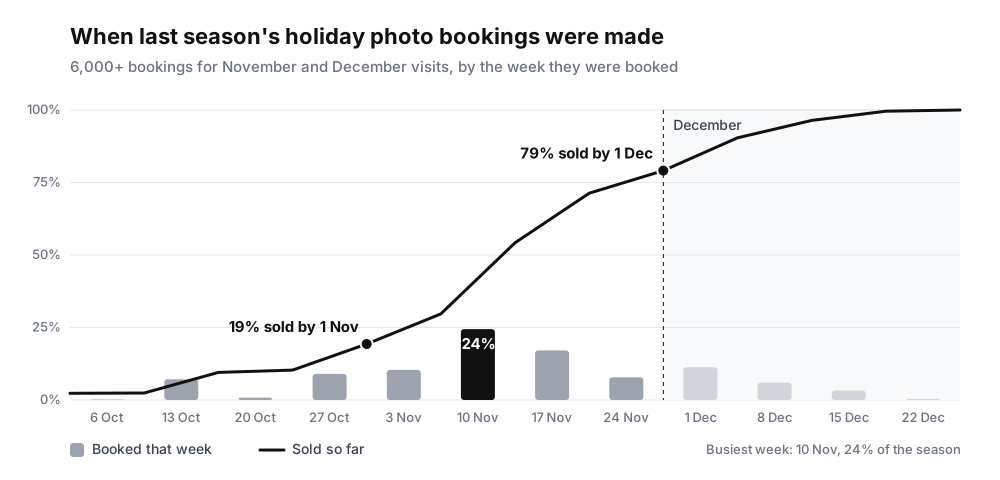
Nearly eight in ten seasonal bookings are gone before December begins. By the time most stores start promoting Christmas in earnest, the season has largely sold itself.
Start now: customers go looking in November
The busiest booking week last season was the week of 10 November. A quarter of the whole season was booked in those seven days, and more than half was gone by the middle of the month.
October was quiet by comparison. Only 19% of the season had sold by 1 November. That is the window you have now: customers are about to start looking, and most of your dates are still unsold.
When customers look, they take the first bookable date they find. If they find nothing, they rarely set a reminder to come back. So open before the season is fully planned. A date you can adjust later is worth more than a perfect schedule published in late November.
If you are not sure how many Saturdays to run, publish fewer and add more as they fill. Adding a date to a calendar people are already watching is easy. Persuading them to come back after they found nothing is not.
Let the waitlist do the chasing
When a slot is full, a customer can join a waitlist for that time.
Last season, 1,625 people joined a waitlist for a holiday shoot. 114 of them got in when a slot opened up, each one a booking that would otherwise have been an empty spot. The other 1,511 never got a slot.
New this year: automatic invites. Turn on Automatically invite waitlisted customers on the Waitlist page, and when somebody cancels or reschedules, the app emails the people waiting for that time. You do not have to watch for it. A cancellation at 9pm can refill overnight instead of becoming an empty spot on your busiest Saturday. The invite does not hold the slot: the first person to book gets it.
The waitlist also shows you demand. A sold-out day tells you demand was at least as large as your capacity. A sold-out day with forty people waiting tells you to open another one.
The waitlist is on the Pro Plus plan and above.
Worth watching: waitlist depth per sold-out date. It is the only honest signal for whether to add capacity.
Protect the slots that matter and change capacity
A Saturday morning in mid-December is the most valuable thing some businesses sell all year. It should not run at the same capacity as a quiet Tuesday afternoon.
With Advanced Availability Rules you keep your normal capacity and add a rule only for the dates and times that are different. Raise capacity when a second Santa or photographer is on, lower it over lunch, or give December weekends their own number. A rule can repeat weekly, cover a date range, apply only at certain times of day, and use different staff.
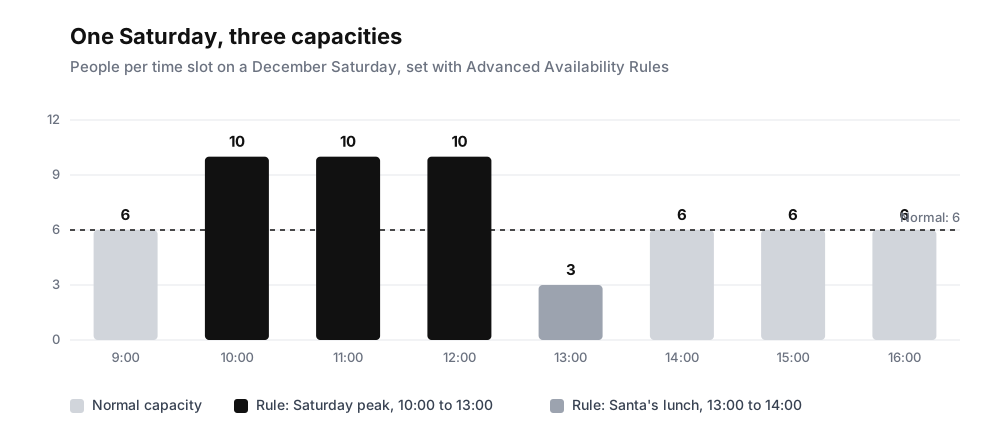
Capacity is per team member, so a slot holds the rule's number times the staff working. Set it up on the service's Availability tab, under Capacity by date. Our help article on changing capacity on busy days walks through it.
Advanced Availability Rules are on the Pro Plus plan and above.
Worth watching: the Peak hours report in Reports (Ultimate plan). It maps bookings by day of the week and hour, so you can see where to raise capacity and where to lower it. Filter it to last November and December to plan this season.
Check guests in with a QR code
A December Saturday with a queue out the door is not the time to search for names. With QR check-in, every confirmation and reminder email includes a QR code. At the counter, tap Scan QR in the Check in tile on Shopify POS, scan the guest's code with the camera or a barcode scanner, and their booking opens ready to check in.
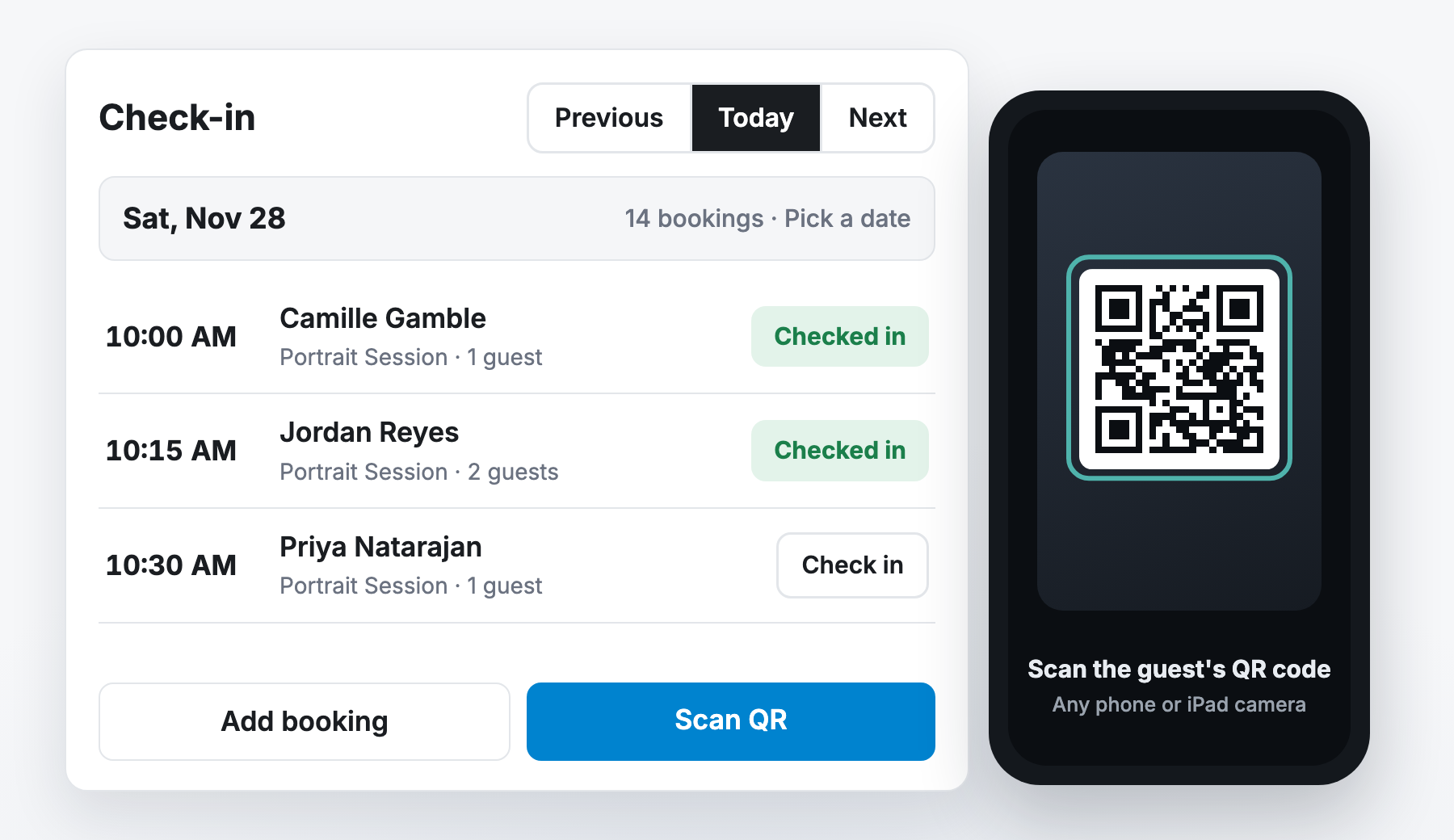
Staff can also search by name or booking ID, and turn on Hide checked-in bookings to see only the people still to come. If two staff share a register, a check-in shows on both within a second, so nobody checks the same family in twice.
Turn it on in Settings > Shopify automations, under Shopify Point of Sale. QR check-in is on the Ultimate plan and in beta.
Worth watching: your line at peak hour. A scan takes seconds, so the queue should move quickly even on your busiest Saturday. Set up QR check-in before your first sold-out day.
Three ways to earn more from each booking
Forty families walking into your shop in December is worth more than forty session fees.
1. Add-ons when they book. Offer prints, digital downloads, a frame or an extra guest as add-ons on your booking page. The add-on goes into the cart with the booking and is paid in the same order, while the customer is still thinking about the occasion. You also know what to prepare before the day. Add-ons are on the Pro plan and above. Set up add-ons.
2. Let them browse, then ring it up fast. After the shoot, families wander the shop. You already checked them in, so there is no need to ask for an email at the register. Open their booking in the Check in tile, tap Add customer to cart, and ring up what they picked. The sale is tied to their customer record, so you can see what booked guests spend after the visit in Reports.
3. Gift the next experience. Your December dates sell out, but January is wide open. Sell a January session as a gift this season. The buyer ticks This is a gift, adds a recipient, a message and a send date, and the booking link goes to the recipient. Set the send date to 25 December and it lands on the morning. It cannot arrive late and it cannot sell out. Packages and gifting are on the Pro Plus plan and above. Read the gifting guide.
Worth watching: post-visit revenue per booked guest. It tells you what a session is really worth to your store.
Figures come from Santa visit and holiday photo bookings across Easy Appointment Booking stores for appointments in November and December 2025, excluding cancelled bookings. All data is aggregated and anonymized across our merchant base.