

On this page
The holidays are close, so this release leans toward selling more and chasing less: packages your customers can buy as a gift, Shopify Flow for every booking including the free ones, a bookings calendar you can read by the week or the day, and a waitlist that fills cancelled slots without you. Here's what shipped over the last month.
Let Customers Gift Your Packages
Customers can now buy a prepaid package for someone else. They tick This is a gift on the product page, add the recipient's name and email, write a message, and choose whether it goes out right after checkout or on a date they pick, up to a year ahead.
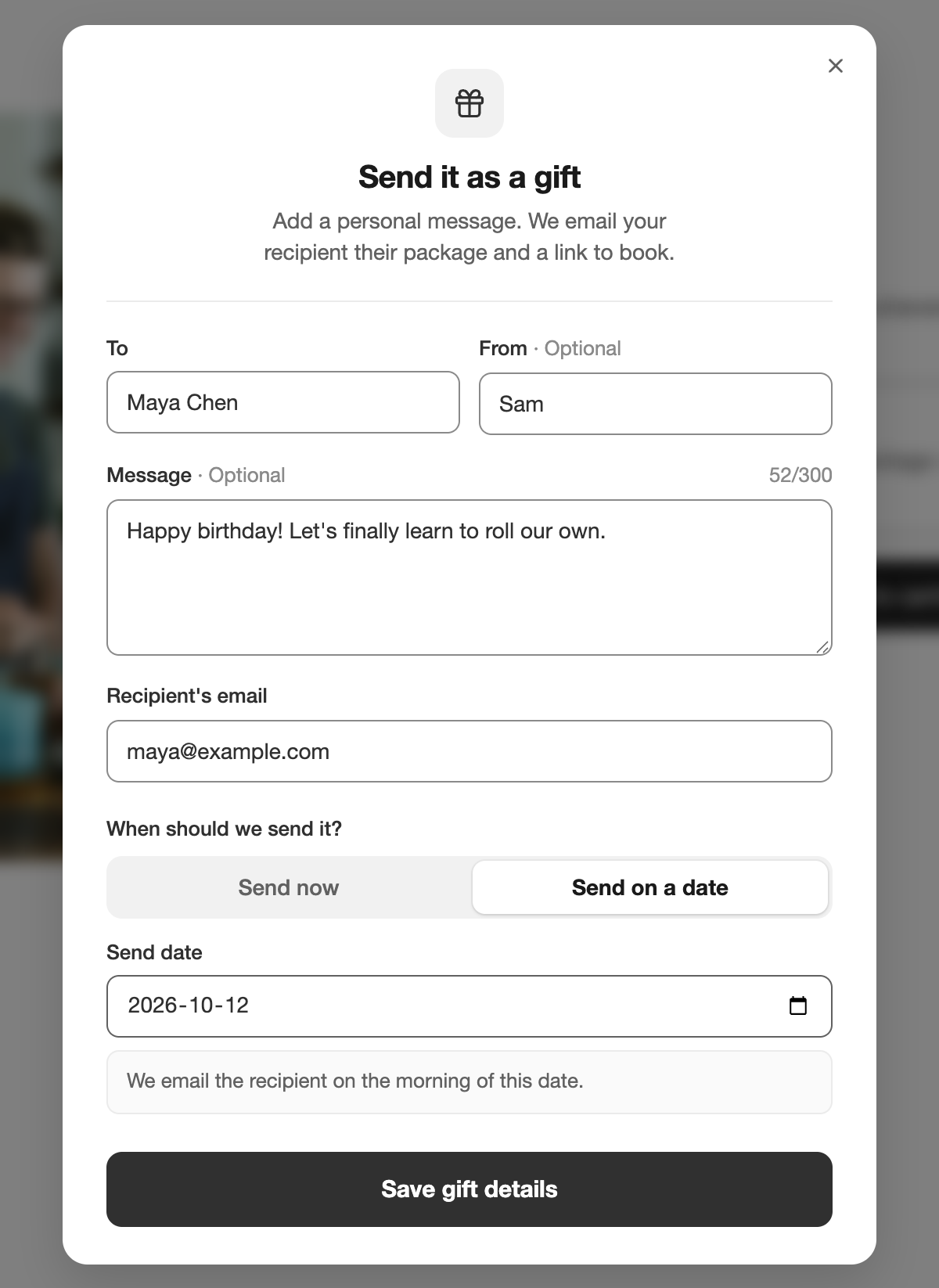
The recipient owns the package. They get an email with the buyer's note, the package code, and a button to book. The buyer gets a receipt, and the Shopify order stays theirs. For a scheduled gift, the expiry period counts from the send date, so a December 25 gift bought in October does not lose two months.
New packages have Allow gifting on by default. Packages you created earlier have it off, so turn it on for the ones you want to sell as gifts. Package gifting is on the Pro Plus plan and above.
Shopify Flow for Every Booking, Including Free Ones
Shopify Flow triggers used to need a Shopify order, which meant free bookings never reached your workflows. Every booking trigger now has a Without Order twin, such as Booking Placed Without Order, and the app picks the right one for each booking.
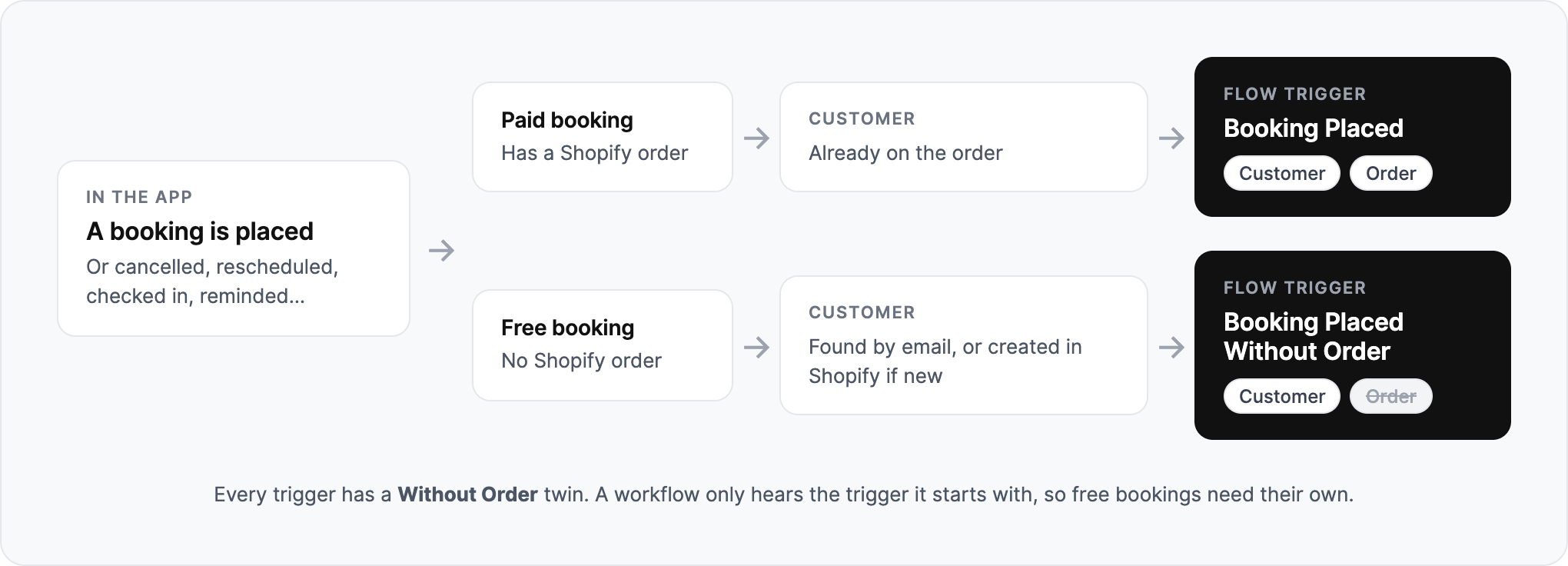
When a free booking is not linked to a Shopify customer yet, the app finds the customer by email or creates one, so you can tag everyone who books a free consultation and send them an offer for the paid service.
A workflow only runs for the trigger it starts with. If you already have one on Booking Placed and you take free bookings, duplicate it and swap in the Without Order trigger. The Flow integration is on the Ultimate plan.
Week and Day Views in the Bookings Calendar
The Calendar tab on the Bookings page now has a Month / Week / Day switcher. Click any date in the month or week to open that day.
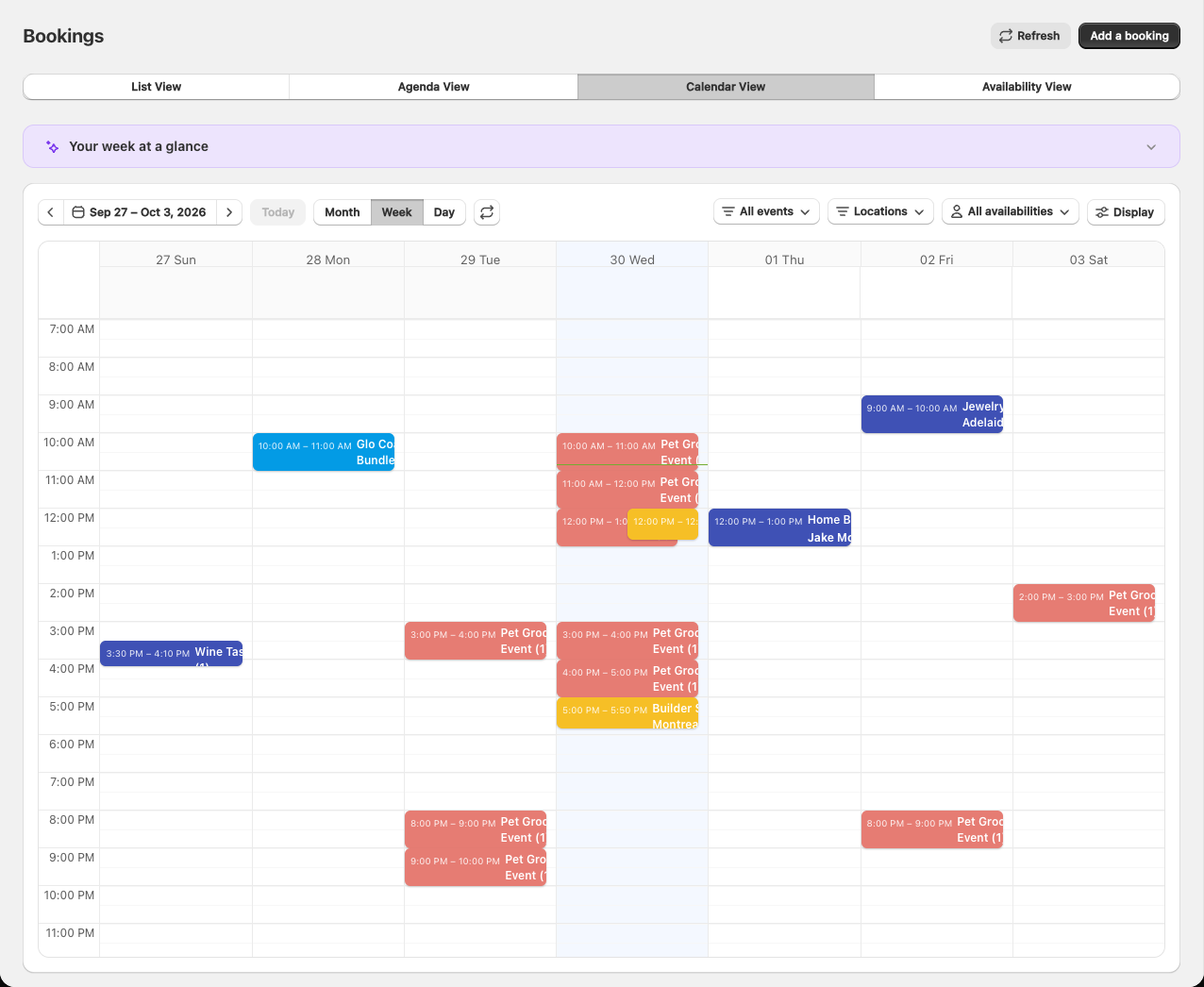
Month view got quieter to make room. Each booking slot is now a single line with its start time, the event name, and the guest count, so a busy day no longer pushes the rest of the month off screen. The Agenda, Calendar, and Availability views also share one toolbar, with date navigation and filters in the same place on every tab.
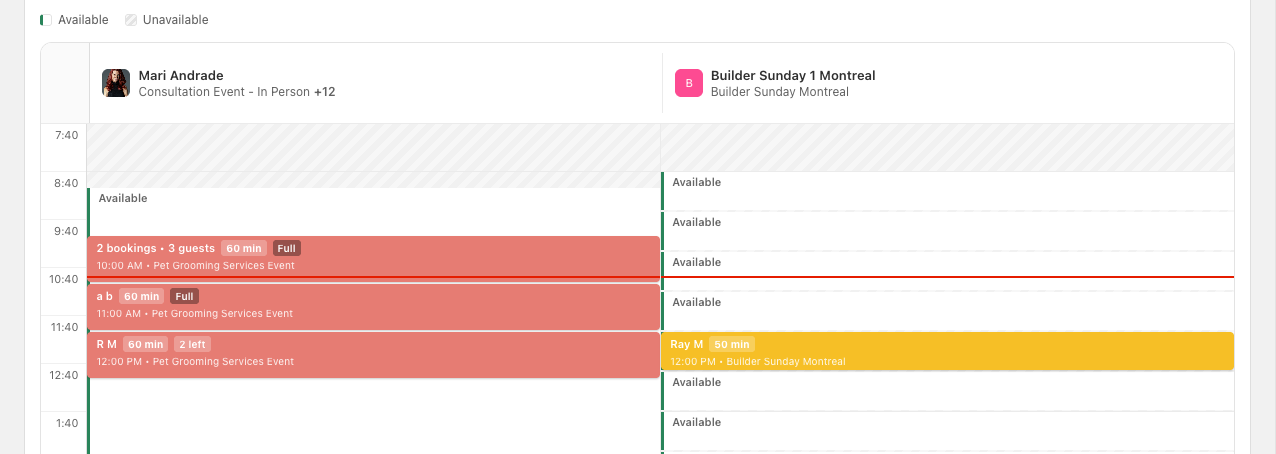
The Availability view is easier to read at a glance. Unavailable time is hatched, open time has a green edge, and each booked block shows how much room is left: "2 left", "Full", or a count like "2 bookings • 3 guests" when several bookings share a slot.
Automatically Invite Waitlist Customers
Until now, a customer on your waitlist only heard about an opening if you sent the invite yourself. There is a new setting at the top of the Waitlist page: Automatically invite waitlisted customers.
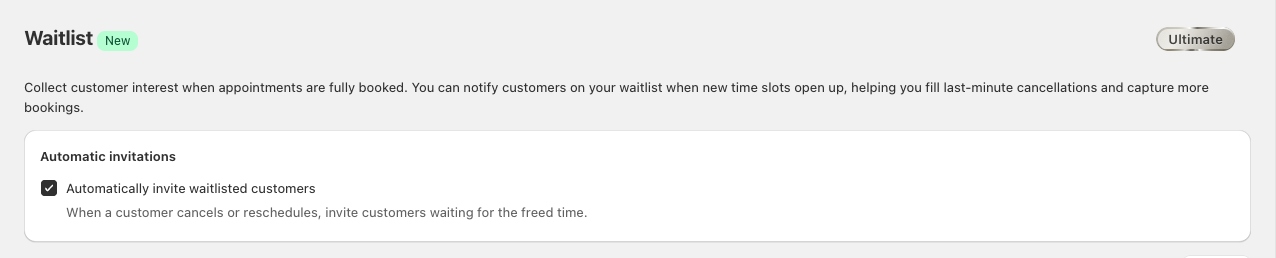
With it on, when a customer cancels or reschedules from their account, everyone waiting for a time within an hour of the freed slot gets an invitation. First to book gets the spot. The setting is off until you turn it on.
Invite links are better too: they now open the booking calendar on the day that freed up, instead of the bare product page.
For developers, the waitlist is part of the public API, with new webhook events for each step from waitlist.joined to waitlist.booked.
The waitlist is on the Pro Plus plan and above. Webhooks are on Ultimate.
Generate Klaviyo Flows Automatically
Connecting Klaviyo used to leave you with a list of events and a blank flow builder. The app can now build the flows for you. Click Create my flows for me and eight ready-made flows appear in your Klaviyo account, each with starter email content:
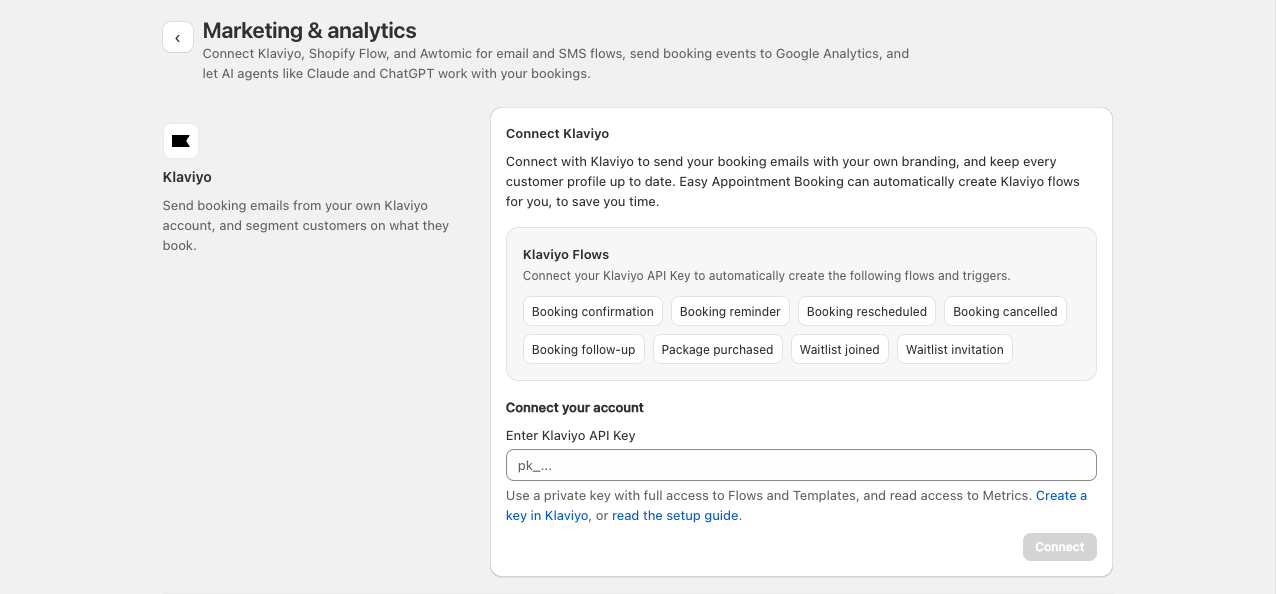
Every flow is created as a Draft, so nothing sends until you have reviewed it and set it Live.
The Klaviyo integration is on the Ultimate plan.
A Clearer Add-to-Cart Confirmation
On paid events, a booking is not confirmed until the customer checks out, and the old confirmation window looked a lot like a finished booking. The new one leads with Check out to confirm, shows the booking as a card with the date, time, and how soon it is, and points the main button at the cart.
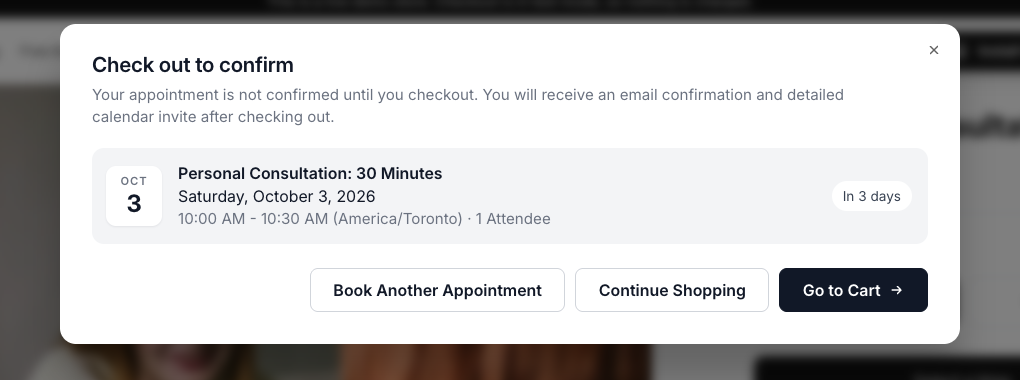
The heading is editable along with the rest of your storefront text.
Add-Ons Follow the Booking
Upsell products, the add-ons a customer can include with their booking, now show up everywhere the booking does:
- In emails: confirmation and reminder emails list the add-ons the customer bought.
- In your bookings list: rows show a line like "Add-ons: 2x Candle", so you know what to have ready.
- At the counter: POS check-in shows the add-ons booked with each appointment.

Choosing one is simpler as well. Products with options get one picker per option, such as Color, instead of a single long variant list, and changing the variant or quantity no longer adds it to the cart; only the Add button does.
Upsell products are on the Pro plan and above.
Chat with Claude
The Claude connector from the last release could find a booking but struggled to add things up. It can now answer questions about totals and trends: how last month went, which service was booked most, who your ten best customers are. It also knows the date in your store's timezone, so "tomorrow" means your tomorrow.
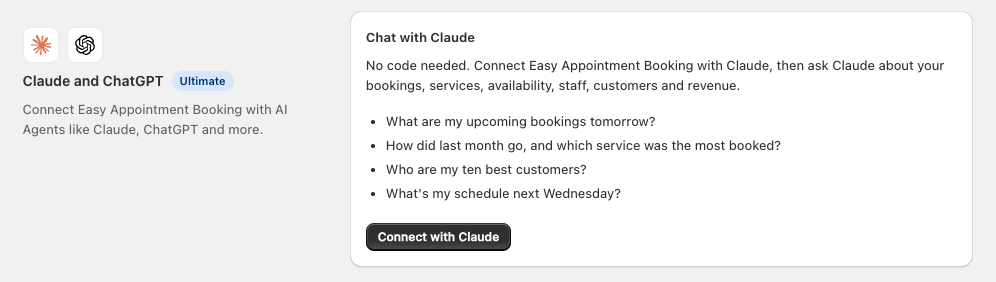
Chat with Claude is on the Ultimate plan.
Improvements
Storefront widgets have their own settings page. What used to be one long App extensions page is now Theme Integration and Widgets, where a menu lists each storefront widget with its current status, and the panel beside it shows only that widget's settings.
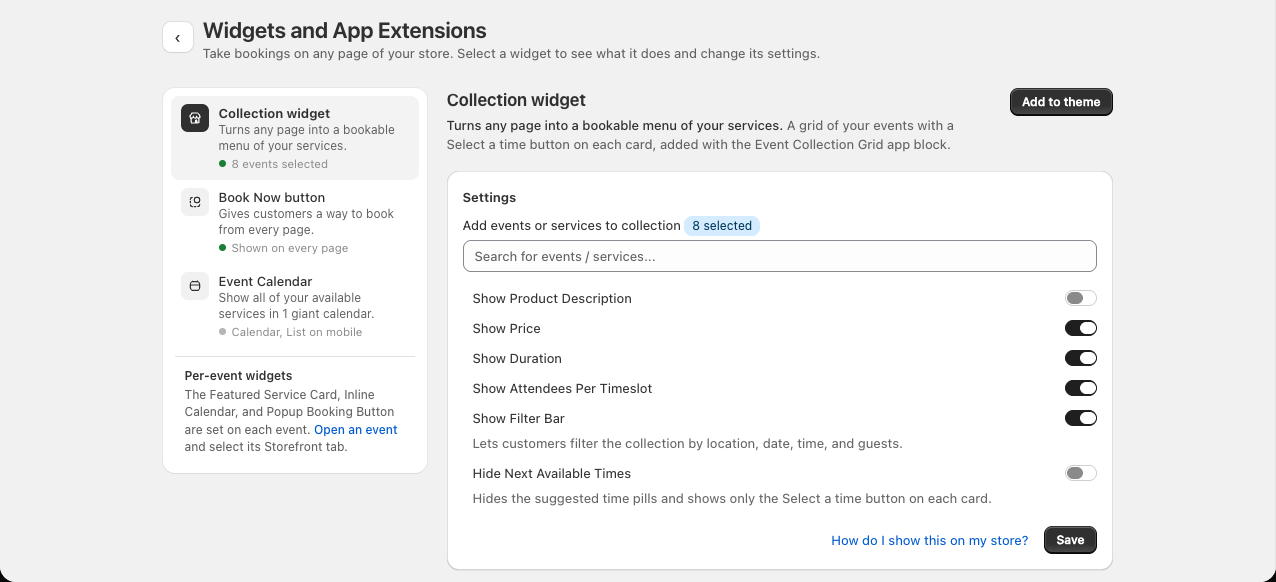
- A setup guide on Home: new stores get a two-step checklist, turn on the app embed and make a first test booking, that ticks itself off as each step is done.
- Customer search in POS: when taking a booking in Shopify POS, staff can search for an existing customer instead of retyping their details.
- Browse other days in the POS roster: the check-in list has Previous, Today, and Next buttons, so you can look at tomorrow's arrivals tonight.
- Filter the Event Calendar by location: a new Location filter setting on the calendar block shows only the events at one location.
- View Bookings from a Shopify customer: the customer page in your Shopify admin has a View Bookings link that opens their full booking history in the app.
- Google Calendar problems surface on the dashboard: if a sync breaks, a banner tells you which calendar is affected and what to do about it.
- Simpler storefront language settings: a cleaner page for translating storefront text, and switching languages keeps the text you customised.
- More of the public API is writable: create and update locations, archive an availability, grant Team Portal access, and mark events as bookable without checkout.
Fixes
- Deposits refund in full: cancelling a deposit booking now refunds the whole deposit, not a fraction of it.
- Blackout dates apply in the admin: creating or rescheduling a booking from the admin now respects store-wide blackout dates.
- Timeslots appear in Chinese and Japanese: fixed slots vanishing when the store language was Simplified Chinese or Japanese.
- Attendee count survives a new time: picking a different time on the storefront keeps the number of attendees the customer chose.
- Daily booking limits are per event: a limit on one event no longer counts bookings from another.
- Buffers stop blocking neighbouring slots: fixed buffer time rounding that counted bookings against the slot next door.
- Reports hold steady across daylight saving: date ranges no longer shift by a day when the clocks change, and exported CSVs handle line breaks in answers.
- Products with many variants work: events on products with a long variant list load all of them on the storefront.
- No more false "booking failed" messages: customers are no longer told a saved booking failed when a follow-up step was slow.
Thanks for using Easy Appointment Booking. Questions or feedback? Reach out anytime.